IBM OpenPages
IBM OpenPages is an integrated governance, risk, and compliance platform that enables companies to manage risk and regulatory challenges across the enterprise. As organizations matures in their GRC framework, OpenPages will scale up to meet specific risk and compliance challenges by providing 11 domain-specific solutions. Businesses can deploy single or multiple solutions based on their needs. These solutions are highly configurable to support their GRC framework.
Contribution: I led the design of the core extensible no-code framework enabling administrators to configure AI integrations and create intuitive experiences for 10,000+ end users.
IBM OpenPages
IBM OpenPages is an integrated governance, risk, and compliance platform that enables companies to manage risk and regulatory challenges across the enterprise. As organizations matures in their GRC framework, OpenPages will scale up to meet specific risk and compliance challenges by providing 11 domain-specific solutions. Businesses can deploy single or multiple solutions based on their needs. These solutions are highly configurable to support their GRC framework.
Contribution: I led the design of the core extensible no-code framework enabling administrators to configure AI integrations and create intuitive experiences for 10,000+ end users.
IBM OpenPages
IBM OpenPages is an integrated governance, risk, and compliance platform that enables companies to manage risk and regulatory challenges across the enterprise. As organizations matures in their GRC framework, OpenPages will scale up to meet specific risk and compliance challenges by providing 11 domain-specific solutions. Businesses can deploy single or multiple solutions based on their needs. These solutions are highly configurable to support their GRC framework.
Contribution: I led the design of the core extensible no-code framework enabling administrators to configure AI integrations and create intuitive experiences for 10,000+ end users.
YEAR
2023
Role
Sr UX Designer
YEAR
2023
Role
Sr UX Designer
YEAR
2023
Role
Sr UX Designer

Context
Context
IBM OpenPages dominates the GRC market, serving enterprises from Citi to national governments. These organizations had invested millions developing custom AI models for PII detection, risk classification, and compliance automation. Yet a critical gap remained: no pathway to integrate these models into their daily GRC workflows.
The business imperative was clear—transform OpenPages from a rigid tool into an extensible AI platform. But the design challenge was complex: enable non-technical administrators to configure sophisticated AI integrations while ensuring intuitive experiences for thousands of end users.
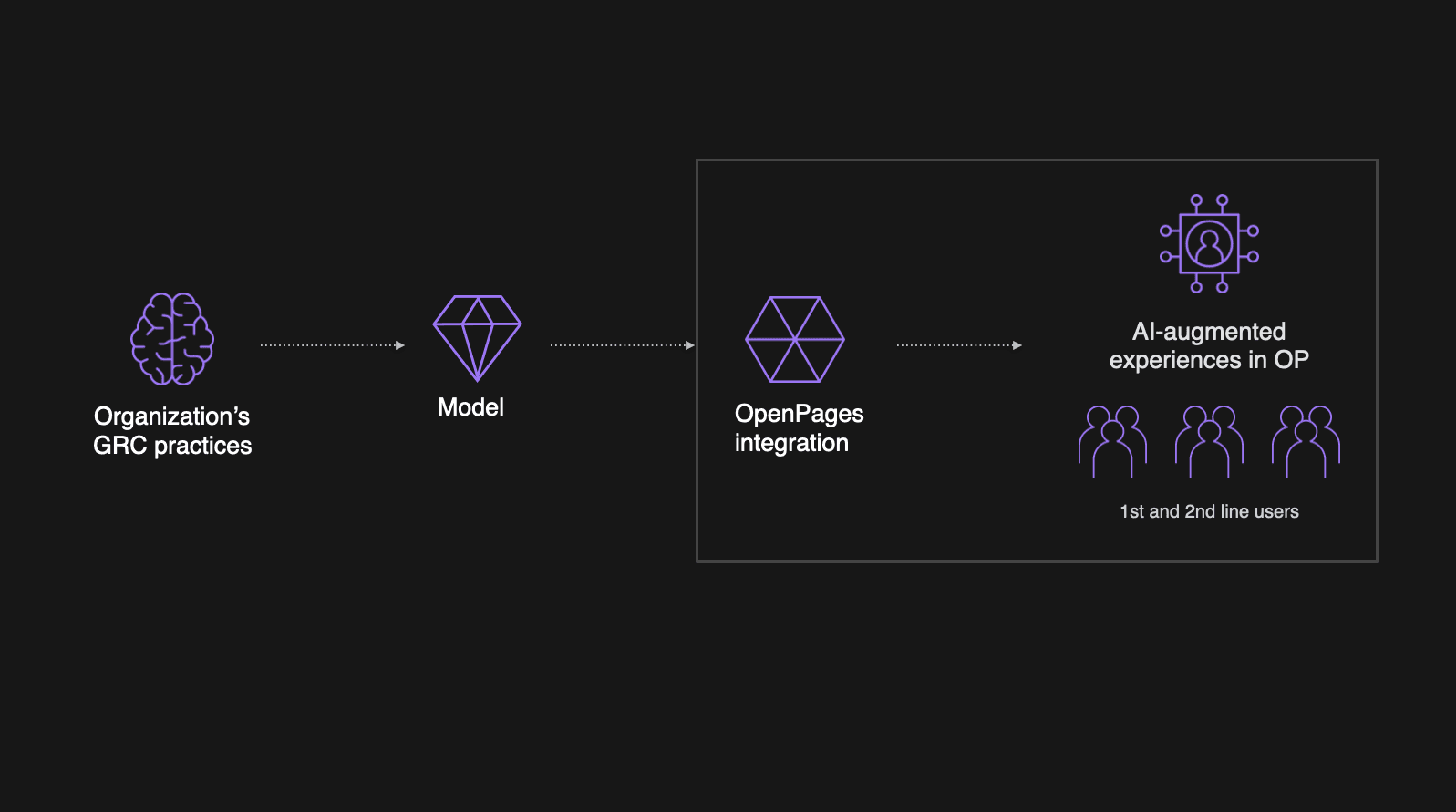
IBM OpenPages dominates the GRC market, serving enterprises from Citi to national governments. These organizations had invested millions developing custom AI models for PII detection, risk classification, and compliance automation. Yet a critical gap remained: no pathway to integrate these models into their daily GRC workflows.
The business imperative was clear—transform OpenPages from a rigid tool into an extensible AI platform. But the design challenge was complex: enable non-technical administrators to configure sophisticated AI integrations while ensuring intuitive experiences for thousands of end users.
Challenge
Challenge
Human-Centered Design for a Three-Persona Problem
This wasn't a single-user problem; it was a complex, three-part ecosystem. Our design process was anchored in understanding the distinct (and often conflicting) needs of our three key personas.
Angela (The First-Line User): A business user who is not a GRC expert. Her primary pain points are a lack of confidence, uncertainty about providing effective information, and no immediate feedback on her work quality. Her goal: "Help me do my task correctly and confidently so I can get back to my real job."
Frank (The OpenPages Admin): Our most critical persona. He's the bridge. He's technically proficient in OpenPages but is intimidated by the model's complexity. His goal: "Give me a straightforward, simplified path to configure this integration and ensure it works for Angela".
Adriana (The Data Scientist): She builds the AI model. She works for the client, not IBM. Her goal: "I need to know how my model is performing so I can get feedback and retrain it."
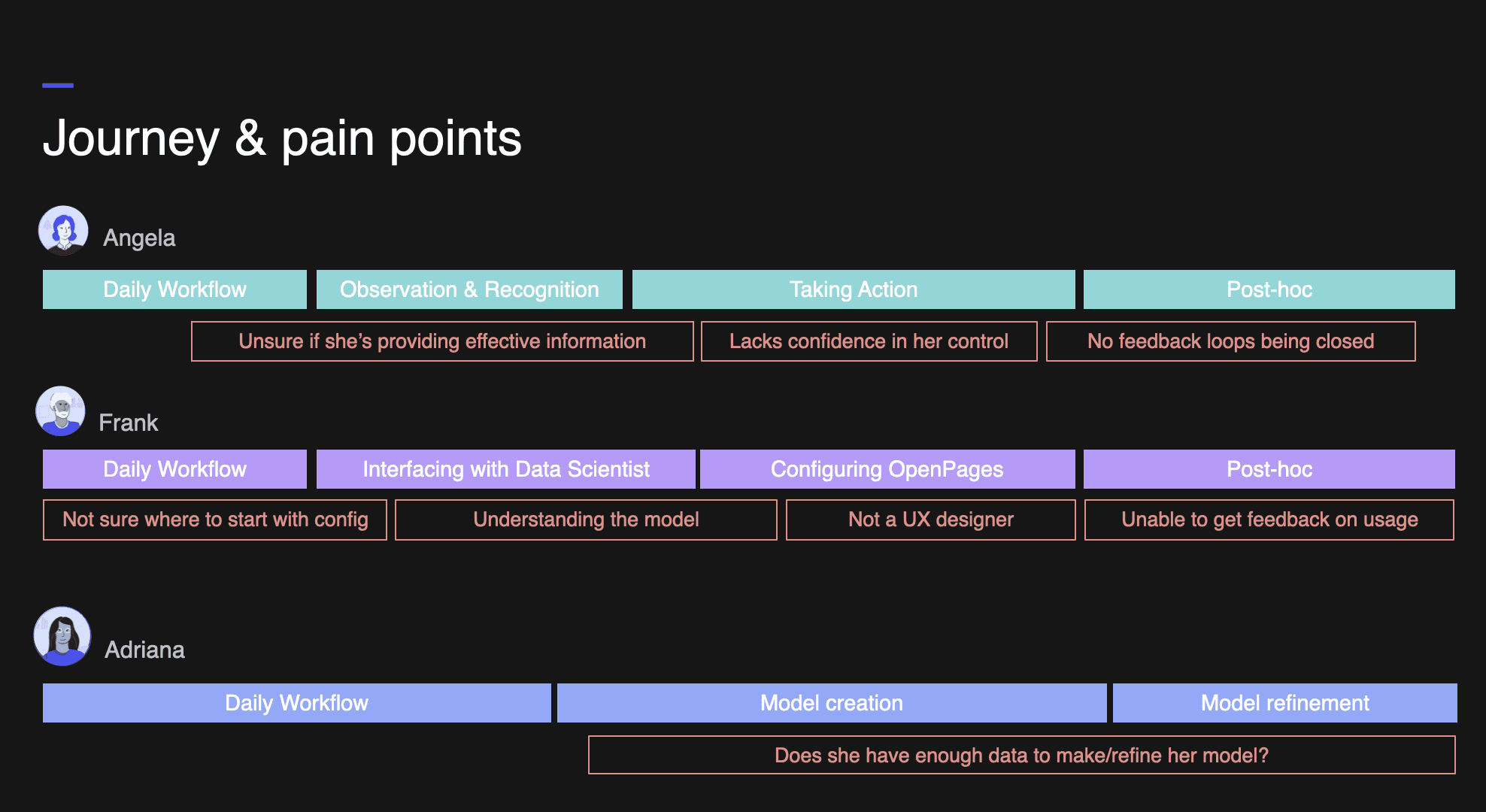
Human-Centered Design for a Three-Persona Problem
This wasn't a single-user problem; it was a complex, three-part ecosystem. Our design process was anchored in understanding the distinct (and often conflicting) needs of our three key personas.
Angela (The First-Line User): A business user who is not a GRC expert. Her primary pain points are a lack of confidence, uncertainty about providing effective information, and no immediate feedback on her work quality. Her goal: "Help me do my task correctly and confidently so I can get back to my real job."
Frank (The OpenPages Admin): Our most critical persona. He's the bridge. He's technically proficient in OpenPages but is intimidated by the model's complexity. His goal: "Give me a straightforward, simplified path to configure this integration and ensure it works for Angela".
Adriana (The Data Scientist): She builds the AI model. She works for the client, not IBM. Her goal: "I need to know how my model is performing so I can get feedback and retrain it."
Approach
Approach
Research & Design Process
Our process was built on "lean, rapid iterations" in close collaboration with PM and Dev.
Discovery & Research: We analyzed a comprehensive AI competitive analysis and synthesized findings from PM-led engagements with key clients. This confirmed our focus on "analyzing data" and "minimizing manual tasks".
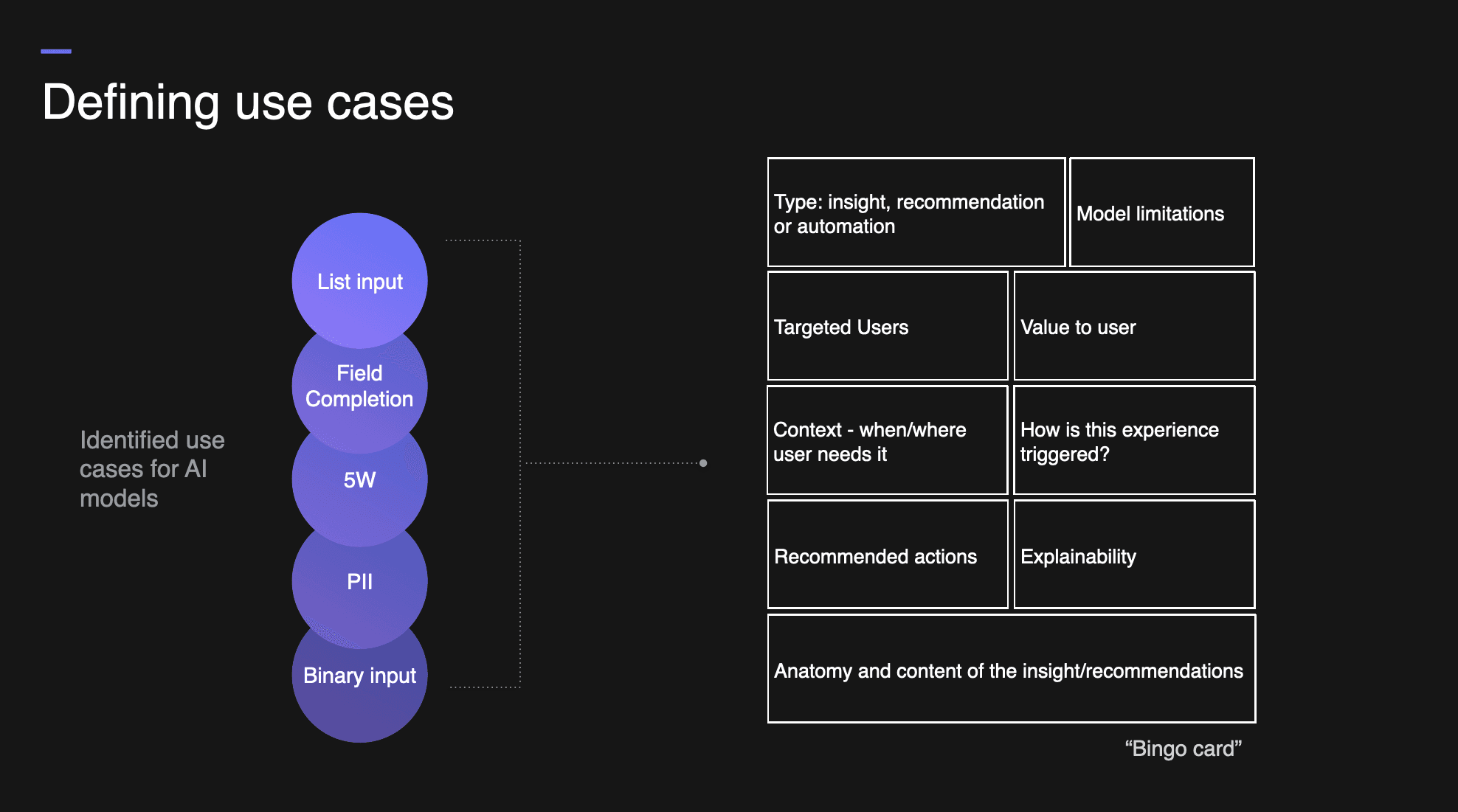
The "Bingo Card" Ideation: To move from abstract to concrete, we listed all known client use cases (PII detection, classification, 5 W's, etc.). For each one, we filled out a "bingo card" defining the user, trigger, value, and explainability.
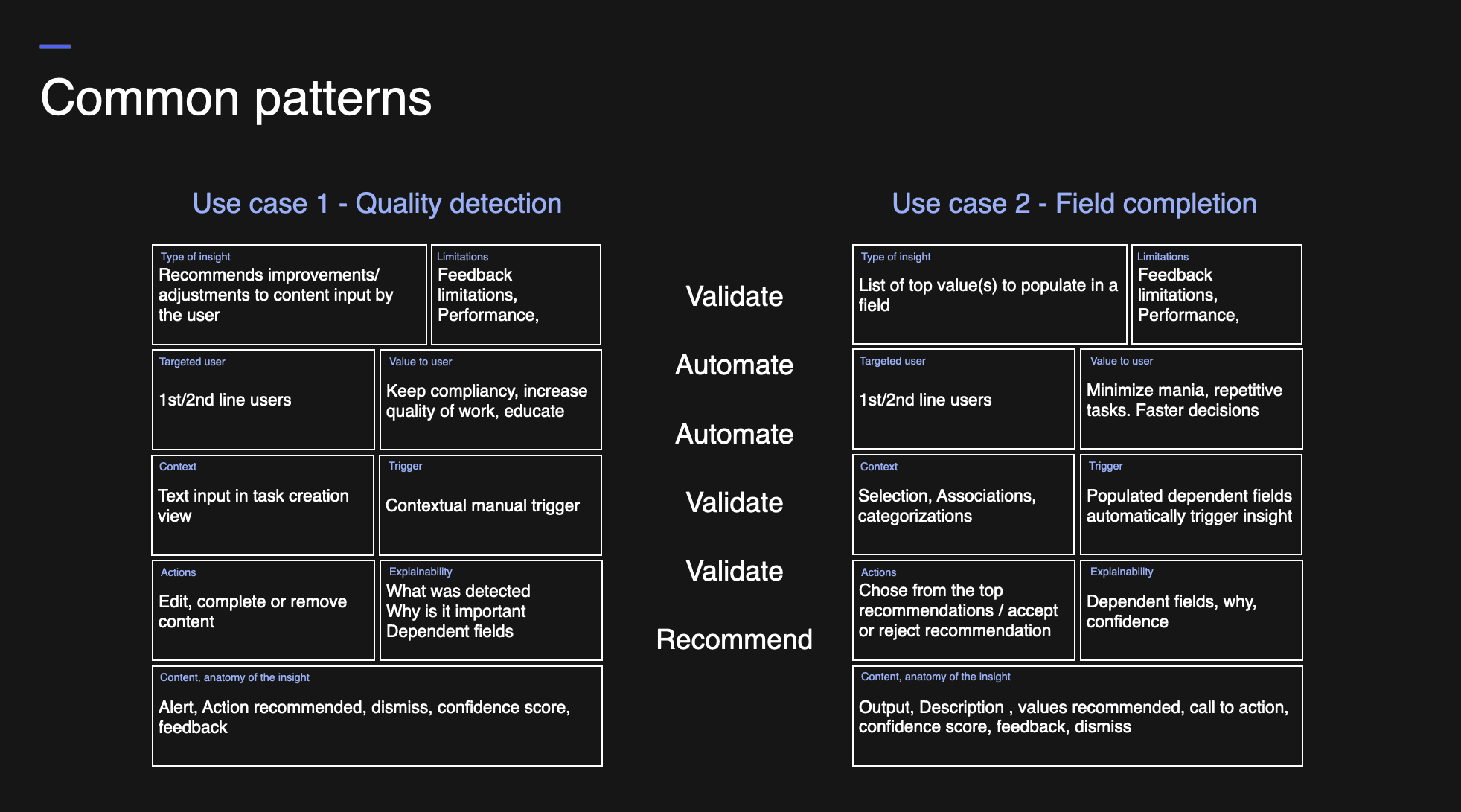
Pattern Finding (The "Aha!" Moment): As we filled out the cards, we saw "emerging patterns". No matter how different the use case, the desired AI action always fell into one of three categories: it was either checking work, suggesting content, or doing work.
The Core Design Framework: This insight led to our central design concept. We would build a framework around three simple, understandable experiences:
VALIDATE: Guided validation of user content (e.g., "Is PII present?").
RECOMMEND: Recommendation of relevant content (e.g., "Here are 3 controls you should map").
AUTOMATE: Automatic execution of repetitive tasks (e.g., "Applying these 5 tags based on your description").
This Validate, Recommend, Automate framework became the foundation for both Angela's (end-user) and Frank's (admin) experiences, providing a shared language for everyone.
Research & Design Process
Our process was built on "lean, rapid iterations" in close collaboration with PM and Dev.
Discovery & Research: We analyzed a comprehensive AI competitive analysis and synthesized findings from PM-led engagements with key clients. This confirmed our focus on "analyzing data" and "minimizing manual tasks".
The "Bingo Card" Ideation: To move from abstract to concrete, we listed all known client use cases (PII detection, classification, 5 W's, etc.). For each one, we filled out a "bingo card" defining the user, trigger, value, and explainability.
Pattern Finding (The "Aha!" Moment): As we filled out the cards, we saw "emerging patterns". No matter how different the use case, the desired AI action always fell into one of three categories: it was either checking work, suggesting content, or doing work.
The Core Design Framework: This insight led to our central design concept. We would build a framework around three simple, understandable experiences:
VALIDATE: Guided validation of user content (e.g., "Is PII present?").
RECOMMEND: Recommendation of relevant content (e.g., "Here are 3 controls you should map").
AUTOMATE: Automatic execution of repetitive tasks (e.g., "Applying these 5 tags based on your description").
This Validate, Recommend, Automate framework became the foundation for both Angela's (end-user) and Frank's (admin) experiences, providing a shared language for everyone.
Key Experiences
Key Experiences
Empowering End Users with Actionable AI
I designed an insights framework that makes AI assistance discoverable, explainable, and actionable:
PII Detection Flow

Visual indicators signal AI availability within form fields.
Real-time detection with orange warning icons for violations.
Specific guidance listing exact PII types found.
Outcome: Users move from uncertainty to confident action.
Smart Categorization

AI analyzes descriptions to recommend classifications.
Presents suggestions as actionable cards.
Supports flexible admin configuration (suggestion vs. forced choice).
Outcome: Complex multi-level decisions simplified to single clicks.
Quality Validation (5W Model)

Validates control descriptions for completeness.
Displays confidence scores for Who, What, When, Where, Why.
Provides actionable quality metrics.
Outcome: Immediate feedback builds user confidence.
The No Code Configuration Experience
My core innovation was the administrator interface that abstracts API complexity into intuitive UX decisions:
Connection Layer
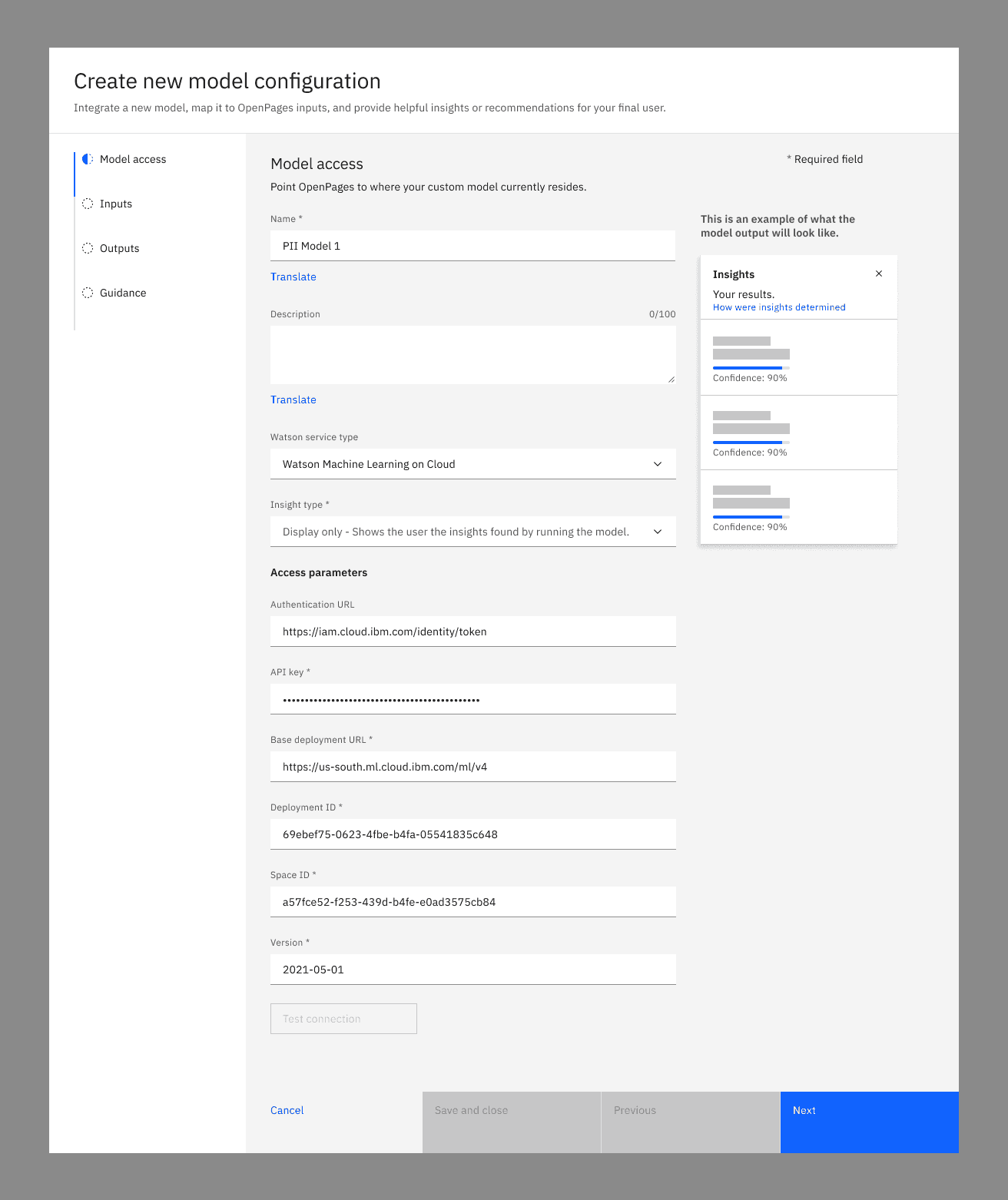
Visual API selection (Watson NLU, WML on Cloud).
One-click connection testing with immediate feedback.
Secure credential management.
Interaction Designer
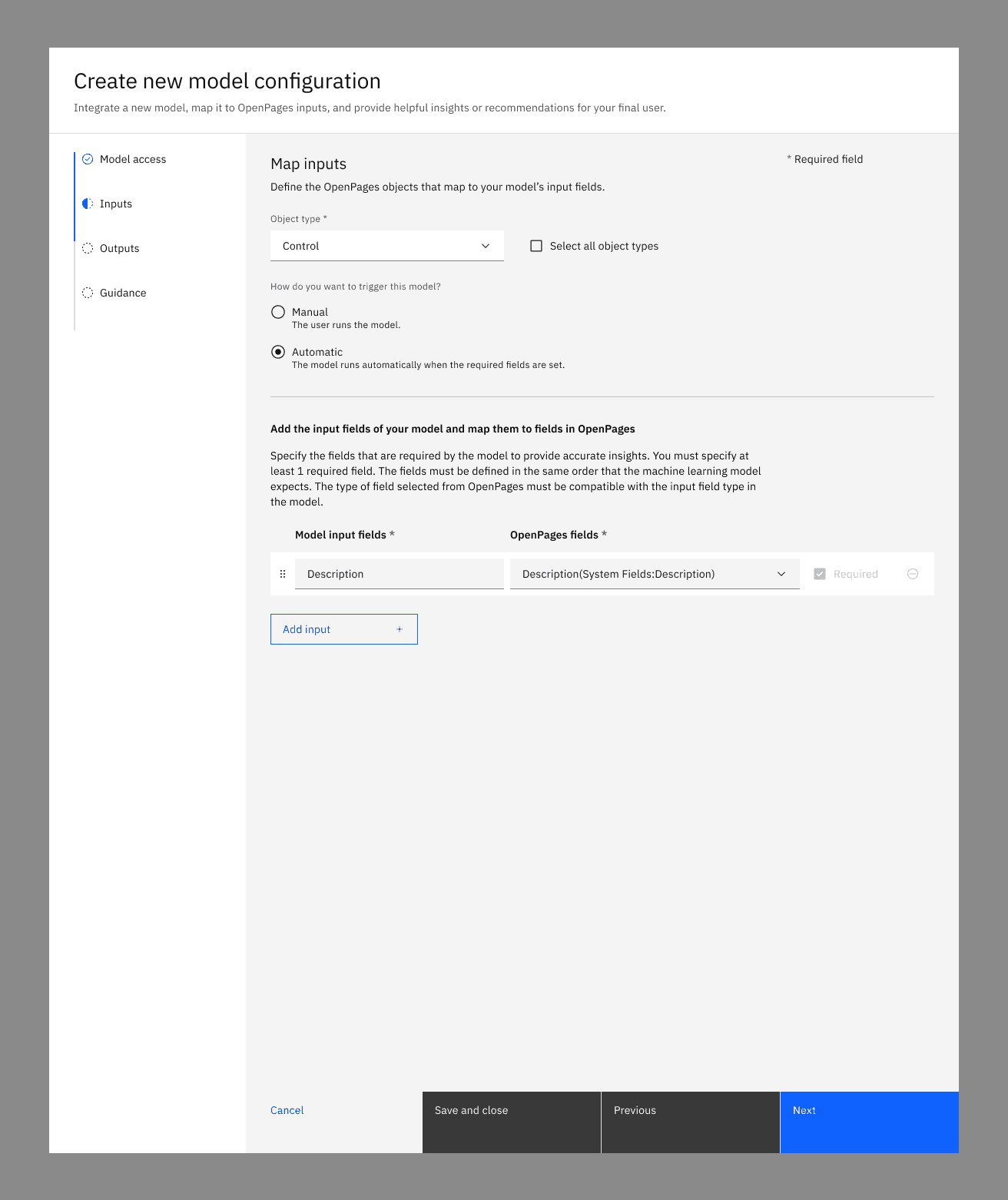
Drag-and-drop field mapping.
Visual trigger configuration (manual vs. automatic).
Required field designation.
Input order management.
Output Transformation
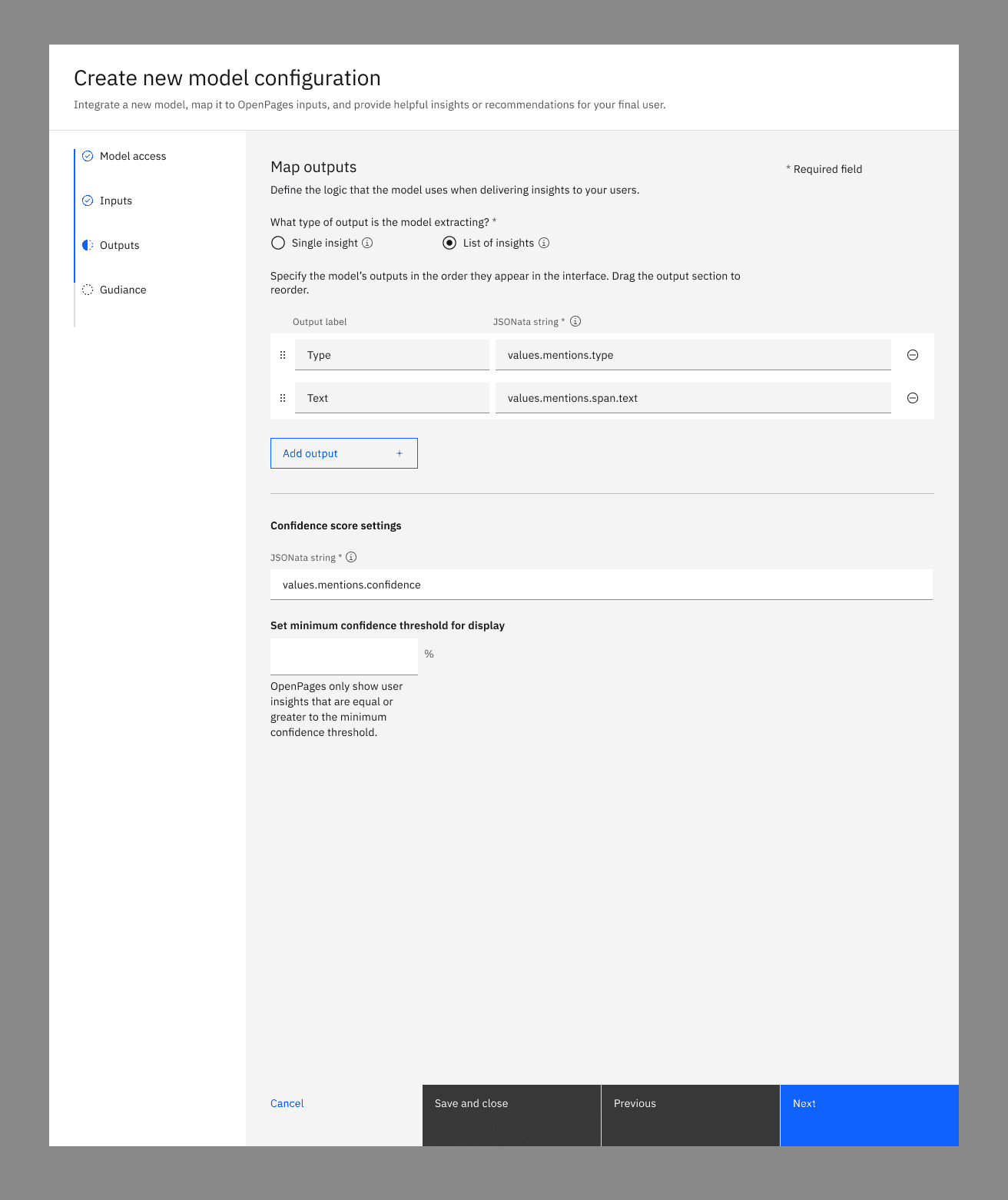
JSON parsing without code.
Visual data manipulation tools.
Confidence score formatting.
Dynamic vs. fixed list handling.
UX Toolkit
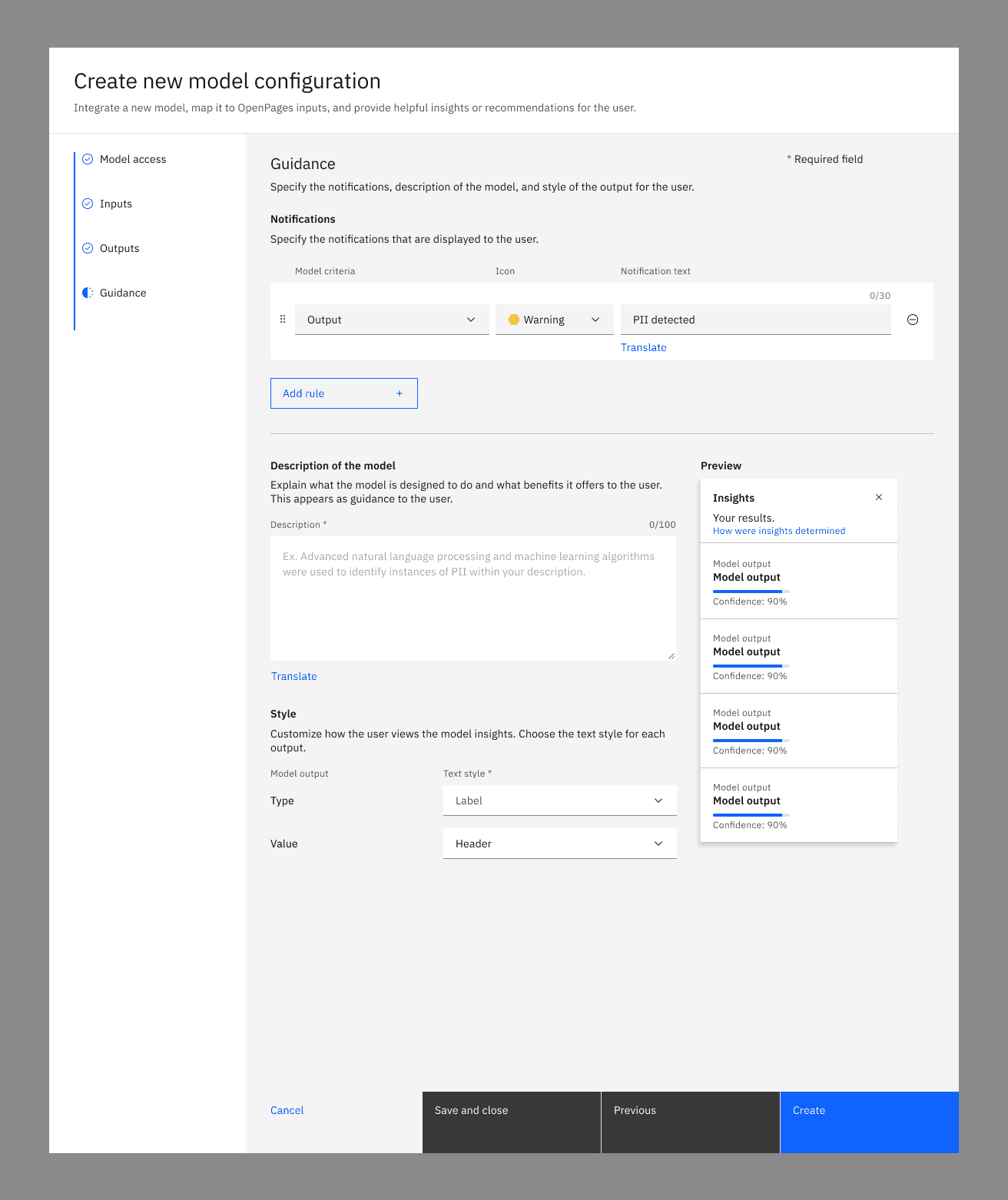
Action type selection (Display, Set Field, Set Tags).
Rule-based alert configuration.
Icon and style customization.
Live preview panel showing exact user experience.
This design empowers administrators to become UX designers, creating tailored AI experiences without writing code.
Empowering End Users with Actionable AI
I designed an insights framework that makes AI assistance discoverable, explainable, and actionable:
PII Detection Flow
Visual indicators signal AI availability within form fields.
Real-time detection with orange warning icons for violations.
Specific guidance listing exact PII types found.
Outcome: Users move from uncertainty to confident action.
Smart Categorization
AI analyzes descriptions to recommend classifications.
Presents suggestions as actionable cards.
Supports flexible admin configuration (suggestion vs. forced choice).
Outcome: Complex multi-level decisions simplified to single clicks.
Quality Validation (5W Model)
Validates control descriptions for completeness.
Displays confidence scores for Who, What, When, Where, Why.
Provides actionable quality metrics.
Outcome: Immediate feedback builds user confidence.
The No Code Configuration Experience
My core innovation was the administrator interface that abstracts API complexity into intuitive UX decisions:
Connection Layer
Visual API selection (Watson NLU, WML on Cloud).
One-click connection testing with immediate feedback.
Secure credential management.
Interaction Designer
Drag-and-drop field mapping.
Visual trigger configuration (manual vs. automatic).
Required field designation.
Input order management.
Output Transformation
JSON parsing without code.
Visual data manipulation tools.
Confidence score formatting.
Dynamic vs. fixed list handling.
UX Toolkit
Action type selection (Display, Set Field, Set Tags).
Rule-based alert configuration.
Icon and style customization.
Live preview panel showing exact user experience.
This design empowers administrators to become UX designers, creating tailored AI experiences without writing code.
Results
Results
For Administrators:
100% no-code configuration capability.
75% reduction in integration setup time.
Direct control over user experience design.
For End Users:
30% improvement in data quality scores.
40% reduction in compliance errors.
Increased confidence metrics across all user surveys.
For the Platform:
Transformed static tool into extensible AI platform.
Enabled new IBM Lab Services revenue stream.
Positioned OpenPages as industry leader in AI-powered GRC.
For Administrators:
100% no-code configuration capability.
75% reduction in integration setup time.
Direct control over user experience design.
For End Users:
30% improvement in data quality scores.
40% reduction in compliance errors.
Increased confidence metrics across all user surveys.
For the Platform:
Transformed static tool into extensible AI platform.
Enabled new IBM Lab Services revenue stream.
Positioned OpenPages as industry leader in AI-powered GRC.
Impact
Impact
This project exemplified my approach to enterprise UX challenges:
Technical Translation: Converted complex AI/ML concepts into intuitive interfaces accessible to non-technical users.
Stakeholder Alignment: Balanced competing needs across data scientists, administrators, and end users while maintaining compliance requirements.
Scalable Systems Thinking: Created framework supporting unlimited AI model types while maintaining consistent user experience.
Business Strategy: Enabled new revenue opportunities through partner model marketplace.
This project exemplified my approach to enterprise UX challenges:
Technical Translation: Converted complex AI/ML concepts into intuitive interfaces accessible to non-technical users.
Stakeholder Alignment: Balanced competing needs across data scientists, administrators, and end users while maintaining compliance requirements.
Scalable Systems Thinking: Created framework supporting unlimited AI model types while maintaining consistent user experience.
Business Strategy: Enabled new revenue opportunities through partner model marketplace.
